


One photograph can shape how people see you for years. A mugshot, an old arrest photo, a leaked private picture, or an unflattering candid can sit in Google Images every time someone searches your name.
One photograph can shape how people see you for years, and the fight to remove negative images from Google starts the day you notice it. A mugshot, an old arrest photo, a leaked private picture, or an unflattering candid can sit in Google Images every time someone searches your name. For a doctor, a founder, or anyone whose work depends on trust, that single image does real damage before a word is read.
You do have options. Some images can be removed at the source or through Google's own tools. Others cannot be deleted, but they can be pushed down with stronger, current content. This guide separates the two honestly and shows the exact steps for each, with the India routes that actually apply.
Quick answer
To remove negative images from Google, first try to delete them at the source (the website owner, or a DMCA notice if you own the copyright). If that fails, report the image to Google using the Results about you tool, the Remove Outdated Content tool, or a personal content removal request. Anything Google will not delete, you suppress by ranking better, current images above it.
Why Negative Images Show Up in Google Search Results
Before you remove an image, understand how it got indexed. That tells you which route will work.
How Google Indexes Images
Google crawls images across the web automatically. When a photo is uploaded anywhere, even on a small forum or a listing site, Google's crawler discovers it and adds it to the image index. The crawler does not check whether the photo was published with consent or whether it invades your privacy. It indexes what it can reach.
A few factors decide how high an image ranks:
- Domain authority. Images on news outlets, social networks, and government databases rank faster and higher.
- File name. A file literally named with your name and a damaging word tells search engines exactly what it shows.
- Alt text and captions. Descriptions attached to the image help Google understand who is in it.
- Surrounding text. Words near the image on the page give context and keywords.
- Inbound links. Pages linking to the image lift its ranking.
- Sharing. Images shared often on social platforms get picked up widely.
So an old arrest photo stays visible because it sits on a high-authority site, the page text carries your name, and other pages have linked to it over the years.
Why Negative Images Rank Higher Than Positive Ones
There is an uncomfortable truth here. Negative images often rank better than flattering ones, for a few reasons:
- News and gossip pages attract clicks and links, which Google reads as authority.
- People share shocking images more than pleasant ones, so the negative photo spreads.
- Older photos on established sites are more settled in the index than a new headshot on your own website.
What most people get wrong is thinking one nice new photo will fix it. A single upload on a low-authority page cannot outrank the same subject on a major outlet. Suppression works, but it needs several strong signals, not one.
What Google Will Actually Remove (And What It Won't)
Google has clear policies. Not every negative image qualifies for takedown, and pretending otherwise wastes your time. Here is the honest split.
Images Google Will Remove
- Non-consensual intimate images. Explicit or fake-explicit images shared without consent are removed from Search under Google's policy, wherever they are hosted. This is the strongest category. If you are dealing with leaked intimate images, act on this route first.
- Content that exposes personal, identifying information. Images published to dox you, showing a home address, phone number, or identity or financial documents, can be removed through a personal content request.
- Copyright-infringing images. If you took the photo, you own the copyright, and a DMCA notice can get it removed even if someone else uploaded it.
- Content that already changed at the source. If the page or image was taken down or edited but Google still shows the old version, the Remove Outdated Content tool refreshes it.
Images Google Won't Remove (But You Can Suppress)
- Unflattering but legal photos. A bad haircut, a candid at a party, an old style choice. Legal, so Google leaves it.
- Photos taken in a public place. Images shot where you had no reasonable expectation of privacy.
- Genuine news photographs. Even an unflattering photo from a legitimate news outlet stays. Your route there is to contact the outlet directly, not Google.
- Court and public-record images from active matters. If a case is ongoing, the record and its images usually stay until the matter concludes.
The honest limitation to hold onto: Google removing an image from Search does not delete it from the website hosting it. The picture still lives at the source, and it can be re-indexed later. Removal at the source is the only permanent fix, and it is not always available. This is why serious cases pair removal attempts with suppression.
This is general information, not legal advice.
How to Report an Image to Google
If the image qualifies under Google's policies, you can report it to Google directly. There are three tools most people should know, and each does a different job. Use the right one and the request moves faster.
Use the Results About You Tool
Google's Results about you tool finds search results that show your personal contact information and lets you request their removal. It also alerts you when new results with your details appear.
Steps:
- Open the Results about you tool in the Google app or at the Google account settings page.
- Add the personal details you want monitored, such as your name, phone number, home address, and email.
- When Google surfaces a result exposing that information, select it and request removal.
- Track the request status inside the tool.
Honest caveat: this tool targets results that expose contact or identifying information. It is not a general button for any unflattering photo. If the image simply embarrasses you but reveals no personal data, this route will not apply, and suppression is your path.
Use the Remove Outdated Content Tool
The Remove Outdated Content tool is for images and pages that have already been changed or deleted at the source but still appear in Google.
Steps:
- Confirm the image or page has actually been removed or edited on the hosting website first. This tool only works once the source has changed.
- Open the Remove Outdated Content tool and sign in with a Google account.
- Paste the image URL or the page URL that no longer reflects reality.
- Submit and wait for Google's review, then check back for status.
This is the step people skip after they win a takedown at the source. If Google still shows the old cached image, this tool prompts a refresh.
Use a Personal Content Removal Request
For images that carry your private information or fall under Google's sensitive-content policies, use Google's personal content removal request. This covers doxxing content, non-consensual explicit imagery, fake explicit images, and identity or financial documents.
Steps:
- Choose the request type that matches your case (personal information and doxxing, or explicit or intimate imagery).
- Provide the exact image URLs and the Google search URLs where they appear.
- Explain clearly why the content qualifies, for example that it was shared without consent or exposes private data.
- Submit and keep the confirmation. Google reviews these manually.
For non-consensual intimate images specifically, you can also register with StopNCII.org to hash-block the images across participating platforms, and in India file a report on the National Cyber Crime Reporting Portal. These run in parallel with Google's own removal.
Step-by-Step: How Do You Remove Images From Google Search
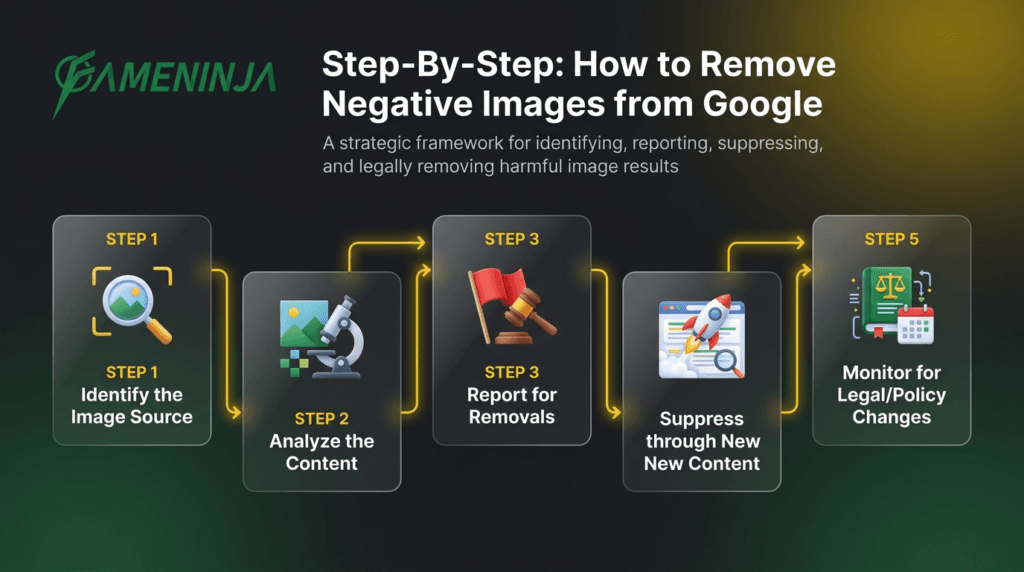
Reporting to Google is one lever. A full removal effort usually runs these steps in order, strongest first.
Step 1: Identify the Image Source
Right-click the image in Google Images and open it in a new tab, or use the visit-image link, to find the page hosting it. Note the domain, the page URL, and any contact details. Government or news sites need different routes than a small blog, so this first check decides everything after it.
Step 2: Contact the Website Owner or Grievance Officer
The fastest deletion is often a polite request to the host. In India, under the IT (Intermediary Guidelines) Rules 2021, most platforms must publish a grievance officer and act on valid complaints within set timelines.
- Find contact details on the About or Contact page, the site footer, or a WHOIS lookup.
- Write a short, professional request. Identify the exact image URL, explain the reason (privacy, no consent, outdated, or unlawful), and give your name and contact.
- Stay calm and factual. Threats weaken your case.
- Follow up in writing if there is no reply, and keep records of every message.
Step 3: File a DMCA Takedown (If You Own the Copyright)
If you took the photograph, you hold the copyright even when someone else published it. File a notice through Google's copyright removal process and directly with the host.
- Confirm you genuinely own the image.
- List every URL where it appears.
- Submit the notice with the required details and declarations.
A word of caution: DMCA claims require real copyright ownership. Filing a false claim can expose you to legal liability, so only use this route for photos you actually created.
Step 4: Report to the Cyber Crime Portal (Privacy and Intimate Images)
If the image is a private or intimate photo shared without consent, this is a criminal matter in India, not just a takedown request. Relevant provisions include the IT Act Section 66E (violation of privacy) and Sections 67 and 67A (obscene and sexually explicit material), alongside the Bharatiya Nyaya Sanhita. Report it on cybercrime.gov.in, which has a dedicated flow for women and children.
Step 5: Legal Notice or Court Order (Last Resort)
When a host refuses and the content is unlawful, a legal notice or a court order may be the route that forces removal or deindexing. Indian courts have recognised a Right to Be Forgotten in several rulings under the privacy line of cases, and the DPDP Act 2023 adds correction and erasure rights, though outcomes are decided case by case. This is where a lawyer and an ORM team work together.
If your problem is broader than one image, our guides on how to remove content from Google and on deindexing court records walk through the same logic for links and pages.
How to Bury Negative Photos and Images in Google
When Google will not delete an image and the host will not budge, suppression is the realistic plan. To bury negative photos, you do not attack the old image. You publish and strengthen better images until they occupy the positions searchers actually look at.
The mechanics are simple to state and slow to earn. Google ranks image results on the same signals that lifted the negative photo: authority of the hosting domain, file name and alt text, the text around the image, links pointing to it, and freshness. So you build several current, well-optimised images of yourself on high-authority pages, describe them accurately, and earn links to those pages. As those signals accumulate, your images climb and the negative one drifts down. Most people never scroll past the first row or two of Google Images, so moving a photo to a lower position sharply cuts how often it is seen. Suppression does not erase the image. It makes it hard to find, which for a legal photo is often the only outcome available. This is steady reputation repair work, not a switch.
Create Current, Professional Images of Yourself
Fresh, high-quality photos signal who you are today.
- Get a proper professional shoot, several usable frames in different settings.
- Use descriptive file names with your name and role, not a random string.
- Write accurate alt text: your name, role, and city where it fits.
- Publish them on your website with your name in the surrounding text, and link from your LinkedIn and company bio.
Optimise Positive Images for Image SEO
Negative images rank because they are well-labelled. Do the same, honestly.
- Descriptive file names, for example your-name-role-city.jpg.
- Alt text that includes your name and profession, without stuffing keywords.
- A title attribute for extra context.
- At least a couple of hundred words of relevant text on the page.
- Internal links to that page from other pages you control.
Publish on High-Authority Platforms
Images on strong domains outrank images on weak ones.
- LinkedIn, kept current, carries real weight for professionals.
- Your official website, with a clean internal link structure.
- Reputable industry directories relevant to your field.
- Press coverage and speaker or event pages that publish your photo.
Earn Links to Your Positive Pages
More quality links lift rankings.
- Contribute guest articles that carry your byline photo.
- Earn media coverage and supply a professional image.
- Take podcast and speaking slots, which usually publish a guest photo.
An Anonymized FameNinja Example (Outcome, Not a Guarantee)
A senior doctor in a metro city came to us because an old arrest photo kept surfacing in Google Images on his name. The case had been resolved and the record expunged years earlier, yet the mugshot still ranked and reached prospective patients. He had already tried on his own: he asked the record-holder to take it down and was refused, he emailed a couple of sites that had republished it with mixed results, and he had posted a new headshot that never climbed.
The plan paired two tracks. On removal, we submitted an outdated-content request to Google once a republishing site edited its page, and pursued the host on the privacy angle. On suppression, we built a set of current professional images across his hospital profile, a medical directory, LinkedIn, and his own site, each with accurate file names and alt text, and supported them with a byline article and an event page that carried his photo.
Over the following weeks his professional images moved up and the old photo moved down and off the first view for most searches. That was the outcome in this case. Results vary with the source of the image, the authority behind it, and whether removal at the source is possible, so we do not promise a fixed result or timeline. If you want the honest version for your situation, our online reputation management team will map it out.
Image SEO Best Practices for Long-Term Protection
Once you have suppressed a negative image, keep the ground you gained.
On-Page Image Optimisation
- Alt text: include your name and role, keep it under about 125 characters, and do not stuff keywords.
- File names: describe the image plainly with your name.
- Captions: add context and credentials where the page allows.
Structured Data for Images
Add Person schema so search engines connect the image to you:
Ongoing Monitoring
- Search your name in Google Images every few weeks.
- Watch for new negative uploads and act early, since a fresh image is easiest to address before it gathers links.
- Refresh your professional photos periodically so recency keeps working for you.
How Negative Images Show Up in AI Search
Search is no longer only ten blue links and a row of images. People now ask ChatGPT, Perplexity, and Google's AI Overviews about a person or business, and those systems summarise what they read across the web, images included. If a damaging photo sits on a high-authority page with your name in the text, an AI engine can surface or describe it in an answer, sometimes stripped of the context that made it defensible.
The defence is the same discipline that helps in image search. Clear, accurate labelling of your real images, current professional photos on trusted domains, and consistent details across your profiles give these systems better material to draw on. You cannot dictate an AI answer, but you can shape the sources it learns from. Treat your image footprint and your text footprint as one reputation, because AI engines read them together.
Talk to us
If a photo is hurting your name and you want an honest plan rather than a promise, we can help you separate what can be removed from what has to be suppressed. Use the WhatsApp button above or request a free ORM report, and we will tell you plainly which route fits your case.